Loading acceleration time-histories
When ran, SeismoSpect opens its Input Motion module, where there is the option of loading a given accelerogram, preferably by reading it from a text file. In order to open the accelerogram, users can click on the Load button and then define the respective input file parameters; first line and last line to be read, the time-step of the time-history and the scaling factor (if users wish to scale up or down the accelerogram being read).
The first line value (equal to 6 by default) essentially specifies the number of lines to be neglected from the beginning of the file. Commonly, accelerogram text files contain introductory header lines, describing their source, characteristics, etc. Evidently, these lines are not to be read by the program. As an example, consider the corrected accelerogram files obtained from the European Strong Motion Database, where a 31 lines header is usually found. For these cases, the first line to be read becomes evidently equal to 32.
The last line parameter (automatically detected by the program) is also needed for those particular cases where the text file contains additional information after the acceleration values. This is a typical behaviour for files coming from a number of strong motion databases whereby velocity and/or displacement time-histories follow their acceleration counterparts. In such cases, it is evidently needed for the last line value to point to the last line of acceleration values.
Accelerograms to be processed in SeismoSpect can feature a maximum of 2^18 data points (i.e. 262144). It is noted, however, that original records featuring an excessive number of data points (e.g. >10000) may lead to slow analyses and, in some cases, system errors, due to the very large memory requirements, for which reason users are advised to crop such large input accelerograms (they typically contain large portions of negligible motion at their start and end) and/or double their time-step (in case an excessively small dt is being employed).
Further, depending on the type of text file format being read, other input file parameters must be defined, as described below.
Single acceleration value per line input text files
To open accelerograms saved in this single-value per line type of format, users must specify one additional input file parameter, i.e. the column in which the acceleration values are to be found.
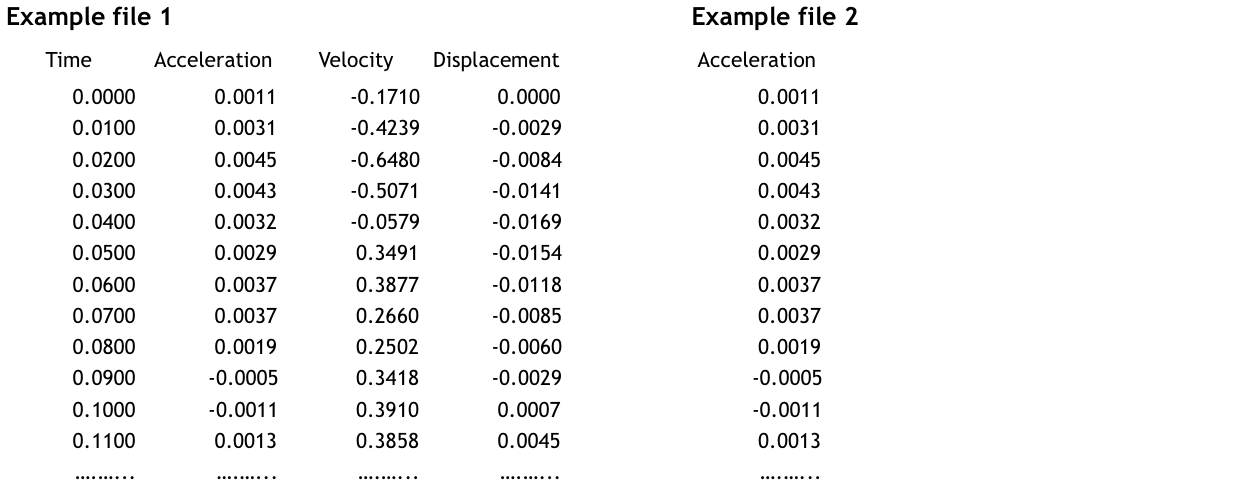
In the case of Example 1 defined above, the Acceleration column would have the value 2 (values in all other columns are ignored by the program), whilst in the case of Example 2, the acceleration column should be defined as 1.
Time & Acceleration values per line input text files
To open accelerograms saved in this Time & Acceleration values per line type of format, users must specify one additional input file parameter (with respect to the previous case), i.e. the column in which the time values are to be found.
Users can find this option useful:
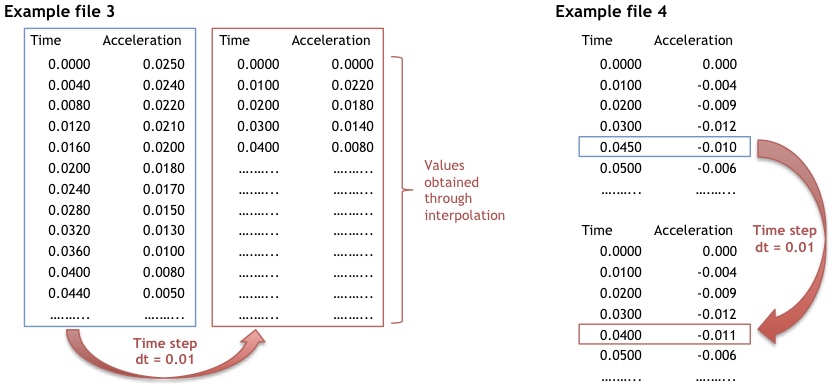
- to load time-histories with a time-step that can then be changed automatically by the program (through interpolation) to the time defined in 'Time Step dt' (see Example 3 below). It can be used in the following cases: (i) the input file features non regularly-spaced time instants, (ii) the input file features a time-step that is too coarse for adequate processing, (iii) the input file features a time-step that is exaggeratedly small, and that will thus unnecessarily delay the analyses or lead to computer memory problems (due to the ensuing very large matrices that are generated by the program);
- to load time-histories defined through non regularly-spaced time steps; the time step that is then adopted by the program is the one defined in 'Time Step dt' (see Example 4 below).
Multiple acceleration values per line input text files
To open accelerograms saved in this Multiple-value per line type of format, users must specify also two additional input file parameters; the Frequency of reading and the initial values skipped. A frequency value of 1 means that all values are read, frequency 2 means that every other value is read, frequency 3 means that one in three values is read (typically used in case of files where values of acceleration, velocity and displacement are given in sequence).
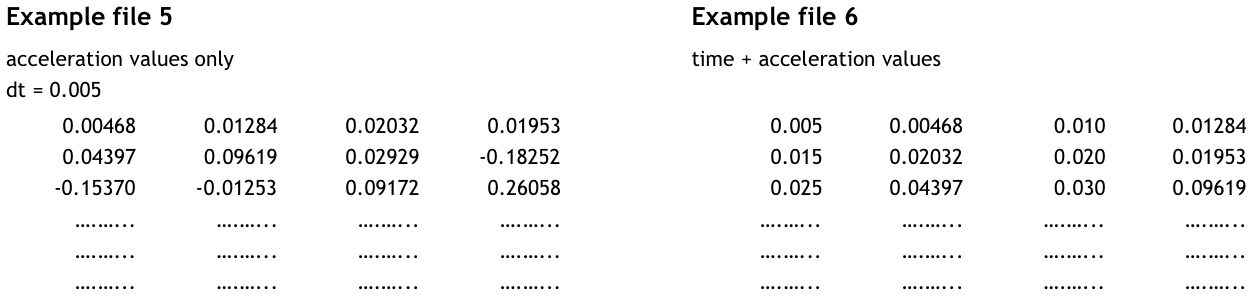
In the case of Example 5 defined above, the frequency to be defined would be 1 (and the initial values skipped should be 0), whilst in the case of Example 6, the frequency value should be 2 (and the initial values skipped should be 1).
ESM Format files
To open accelerograms saved in the ESM format, users do not need to specify any additional input file parameter, since these parameters are automatically detected by the program.
Note: In case that users do not wish to load the whole accelerogram, they might make the proper modifications by changing the values of the First and/or Last line, the Scaled Factor, the Frequency and the Initial Values Skipped. Users are advised to have a deep understanding of the ESM format before making any modification to the above parameters.
SMC Format files
To open accelerograms saved in the SMC format, users do not need to specify any additional input file parameter, since these parameters are automatically detected by the program.
Note: In case that users do not wish to load the whole accelerogram, they might make the proper modifications by changing the values of the First and/or Last line, the Scaled Factor, the Frequency and the Initial Values Skipped. Users are advised to have a deep understanding of the SMC format before making any modification to the above parameters.
PEER NGA Format files
To open accelerograms saved in the PEER NGA format, users do not need to specify any additional input file parameter, since these parameters are automatically detected by the program.
Note: In case that users do not wish to load the whole accelerogram, they might make the proper modifications by changing the values of the First and/or Last line, the Scaled Factor, the Frequency and the Initial Values Skipped. Users are advised to have a deep understanding of the PEER NGA format before making any modification to the above parameters.
SHAKE Format (.eq) files
To open accelerograms saved in the .eq format, users do not need to specify any additional input file parameter, since these parameters are automatically detected by the program.
Opening multiple files and changing units
A user can also load a group of accelerograms at the same time as long as all the records are in the Time & Acceleration values per line format. To do so, users can click on the Load Multiple button and then use the dialog window to select the group of accelerograms.
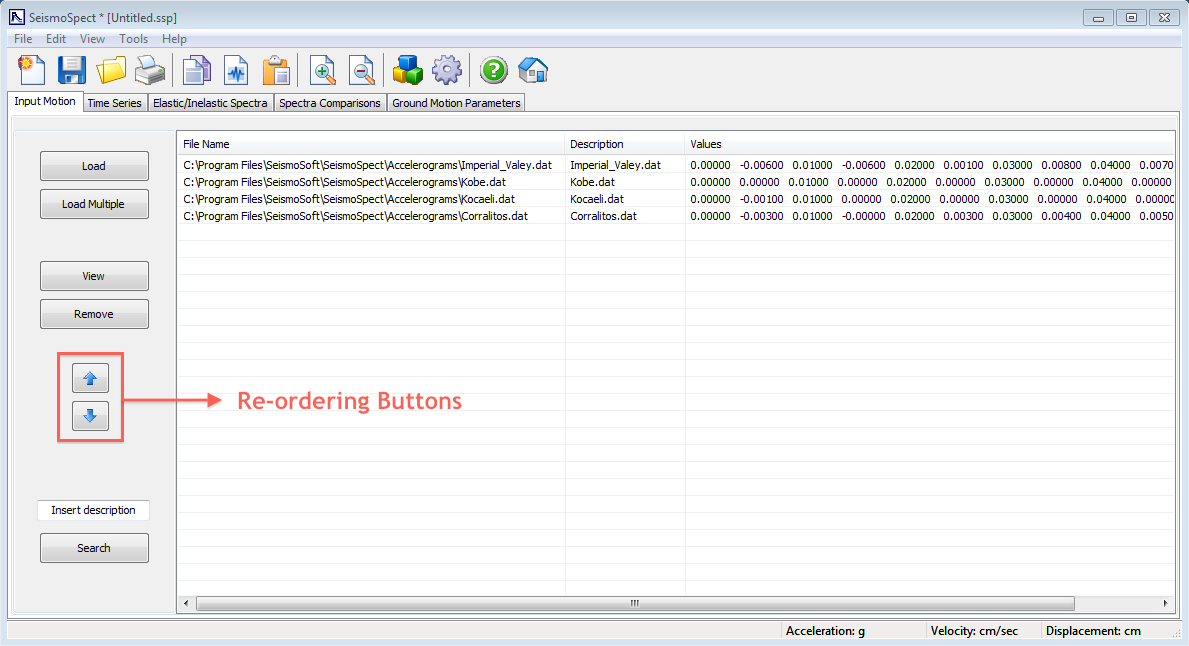
Users can also take advantage of the 'Change Units' facility to set the units used by the program as equal to those of the input file. The units system that is currently being used by the program is always presented on the status bar located on the bottom of SeismoSpect window. Once an accelerogram has been loaded into SeismoSpect, an entry will be added to the table that occupies the majority of the first module.
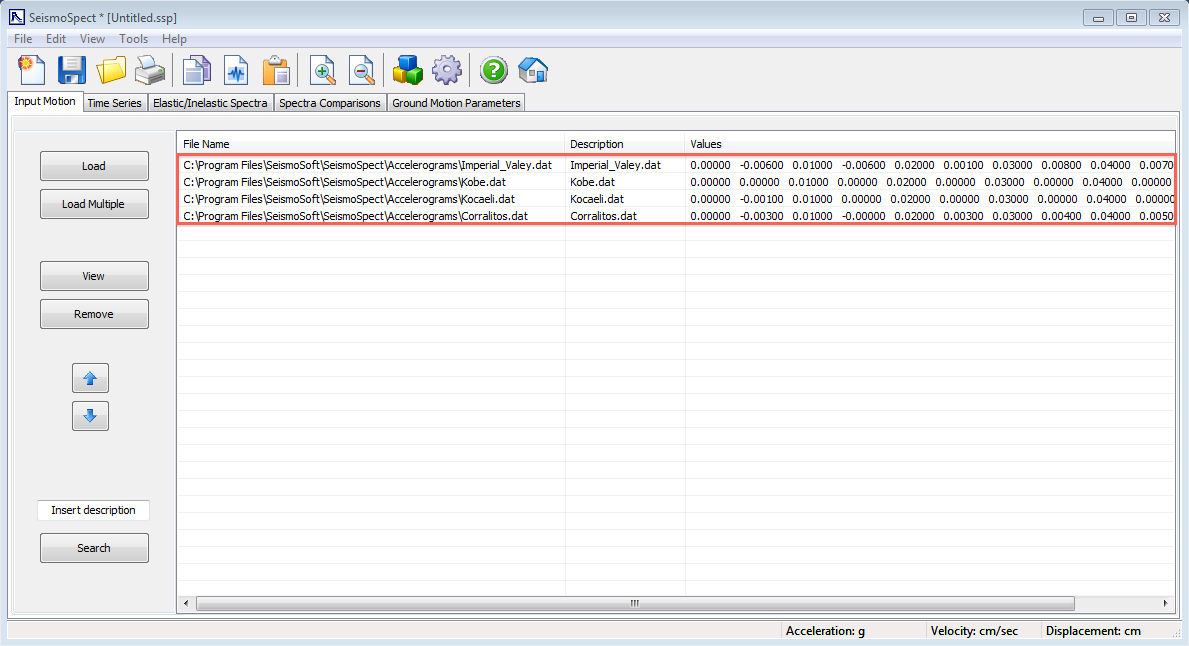
From this table it is possible to check information such as the location of the records, the description and its loaded data. By double-clicking on an entry or by selecting and then pressing the View button, a window will be displayed in which users will be able to see the acceleration time-histories plots and respective values in a table. From this second window it is also possible to change the description of the selected ground motion record.
On the lower left corner of the main window in this module, users can use the Search facility to find a record that may otherwise be difficulto to identify (e.g. if a very large number of records has been loaded). Finally, it is noted that users may also re-order the records, in order to change the way they are listed in the other modules.
Note: On occasions, text files coming from a Unix environment (common in many databases) are not properly read by SeismoSpect. In such cases, users are advised to open the file with a text editor and save it in ANSI/DOS format. This should solve any eventual difficulties.